Runs, acceptance & changements
A workflow never lands anything on its own. Work happens inside a run, and a run only ever produces a proposal. A run proposes; only your acceptance lands anything.
The loop at a glance
You attach a workflow to a mission — or invoke one, which creates its mission for you. You start a run; the run executes the graph on its own branch, away from the mission's work so far. When it finishes, it sits in Proposed with its changes ready for you. You inspect the result and decide: Accept run lands the work on the mission as one changement; a proposal you don't accept lands nothing, and the mission stays exactly as it was (declining is not a button).
Start a run
Runs start from the mission page. The Runs & acceptance board lists every run this mission has had, past and present — the live tag in its header means it refreshes as the mission moves — and each new run starts from the mission's current state.
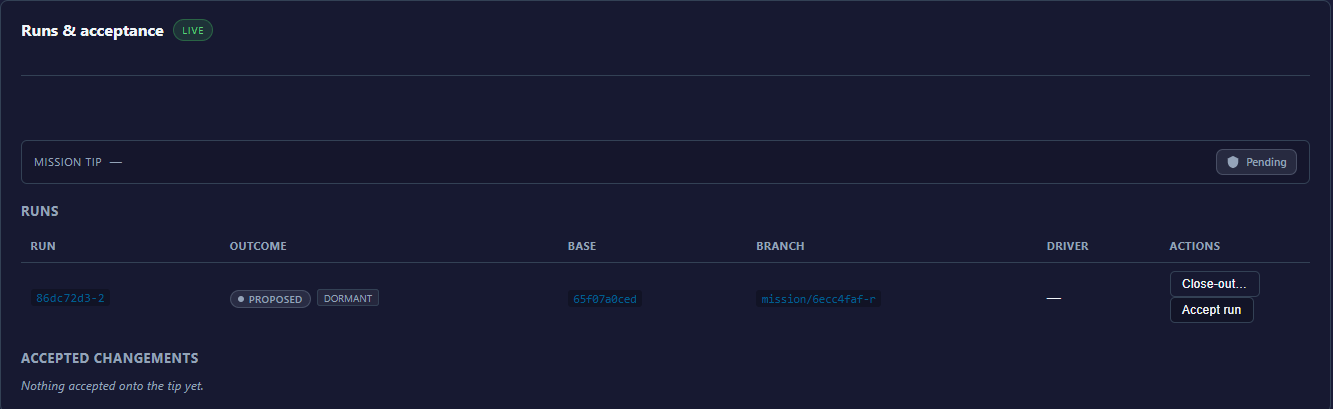
Each run row shows its outcome and, when they apply, two small badges: dormant — the run has no provisioned target yet, nothing has run against it — and stale — the run's base is behind the mission tip, so an accept would refuse until you start a fresh run.
A run can refuse to start. The reasons you will actually meet:
- A run is already open. One run at a time per mission — wait for it, or accept or discard it first.
- The mission isn't planned yet. Its plan isn't in place; let it get there first.
- The mission is finished. A completed or cancelled mission takes no new runs.
Anything more exotic is an agent-level refusal; the full list lives on the agent pages.
While it runs
While a run executes, its gates pause into your Decisions queue: the run holds at the gate until you respond (or, if the gate was authored with a timeout, until it expires), then resumes. Everything else about a live run — the graph view, per-node status, the coder session panel — is in the run viewer; see Watching a run.
A run proposes changes
A run is born Proposed and stays there until you decide.
| Outcome | What it means |
|---|---|
Proposed | The run's changes exist on its own branch and wait for your decision. |
Accepted | You accepted; the changes landed on the mission as a changement. |
Rejected | The run was declined — dropped with the agent verb, or a competing sibling was accepted instead. Nothing landed, and the run branch is gone. |
Superseded | The run was replaced by another run and is out of play. |
The full cheatsheet is under run outcomes.
Accept
Accept run does three things, in order — and refuses rather than half-doing any of them:
- Stale check. The run started from a specific mission state. If the mission has moved since, the accept refuses.
- Physical validation. The merged result must be verified mechanically before it lands. This is fail-closed: if the system cannot mechanically verify the merge, it refuses — it never lands work on anyone's word, including its own.
- Merge. The changes land on the mission branch, and a changement is created to record them as one reversible unit.
On the board, a proposed run carries two buttons: Accept run — it reads Accepting… while it works — and Close-out…, which opens the run's close-out checklist. Anything the run left open — a leftover task, an open gate, a failed node — needs a dated dispose note there before the accept unlocks; a clean run answers "No leftovers — every node landed terminal and clean."
Why an accept may refuse:
- Things moved underneath. The mission advanced since the run started. Start a fresh run.
- Merge conflict. The run's changes no longer apply cleanly. Start a fresh run from the current state.
- Another run already won. If runs were competing (below), only one gets accepted.
A refused accept lands nothing and breaks nothing — the mission is untouched.
Declining a proposal
There is no discard button on the run board: a proposed run is either accepted or left where it is. Leaving it is safe — nothing happened to the mission, so there is nothing to undo — but the mission won't take a new run while a proposal is still open.
An unwanted proposal clears in one of two ways. Accepting one proposal auto-rejects the other proposed runs in its competing group, and their branches are deleted — that answers "what happens to the others?" for competing runs. And agents can drop a run explicitly with the MCP verb mission_run_discard (agent reference): the run is marked rejected and its branch deleted. Either way it is the cheap way to say "not this one" — nothing ever landed.
The changement stack
On the board this is the Accepted changements stack — empty, it reads "Nothing accepted onto the tip yet." Each accepted run becomes exactly one changement, and changements stack in order on the mission's branch. The mission's merge request is that composed stack — not a pile of raw commits, but a sequence of accepted, validated deltas. Because every accept is validated before it merges, the tip of the mission is always a state that passed validation.
Revert
Any changement can be reverted — its Revert… button shows a preview before anything is undone. The preview shows the cascade: later changements that touch the same files depend on the one you're reverting, and they revert with it, in reverse order. If a revert would conflict, ARDS refuses rather than guessing at a resolution. And nothing evaporates: the reverted changement and the revert itself both stay in the mission's history, dated and attributed.
Competing runs
Advanced, but worth knowing exists: you can start several runs from the same starting point — different workflows, different parameters, different instructions — as one competing group. Inspect them side by side and accept the one you prefer; the losers are rejected and their branches deleted. It is A/B testing where the judge is you, on real, validated results.